Release Notes - 04/03/2026

Property Preview — “Successfully Marketed Properties” (Shop Profile)

This update adds a dedicated preview on Shop Profile pages for properties the shop has successfully sold or rented out. It’s designed to showcase closed deals and strengthen credibility with potential clients.
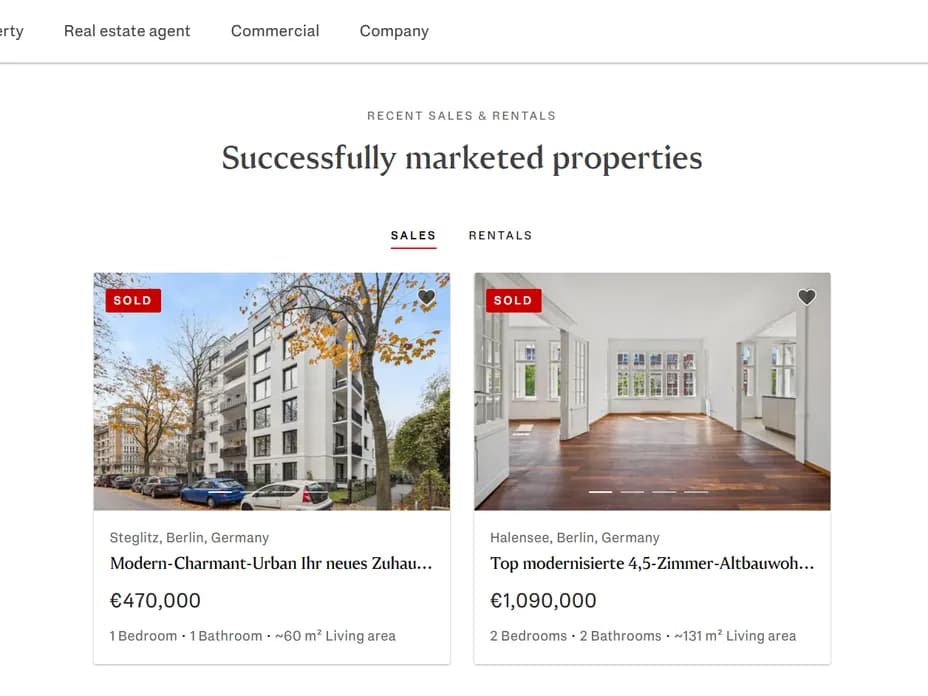
Webpage showing recently sold properties in Germany, one in Steglitz for €470,000 and one in Halensee for €1,090,000.

Where it appears

  • On Shop Profile pages, above the Team section.

  • It’s a separate preview from the standard “Available properties” preview (that one only shows ACTIVE listings).

What users will see

  • A new block called Successfully Marketed Properties with an overline and headline

  • Two tabs may appear: Sales and Rentals. Each tab shows cards for properties that are SOLD / rented out.

  • The preview displays as a slider when there are enough items. If a tab has fewer than <2 properties it will be hidden; if no tab qualifies the whole preview is hidden.

  • Cards behave like other property previews (clicking navigates to the property). The component intentionally does not show a “See all properties” button.

Why this helps

  • Converts closed-deal data into social proof — visitors see examples of successful sales and rentals your shop handled.

  • Helps build trust quickly on the shop page without adding editorial work: the preview pulls from the same property data the site already uses.

Editor guidance (quick)

  • No manual population needed — the preview uses the existing property feed (SOLD / rented items).

  • If you don’t see the preview, check whether the shop has at least two items for a tab; otherwise the component will stay hidden.

  • Important: Sold / rented out properties are shown for max. 8 weeks when the property status was sent in EVA to "Sold by E&V" and it's still marked to be shown on the E&V website.

  • Because commercial properties are typically created in EVA and managed in an external CMS, they aren’t technically flagged as sold or rented out for Search—so the Property Preview won’t appear on commercial shop profile pages.

Notes & behavior details (for completeness)

  • The preview filters for SOLD (includes rented-out) properties and sorts by price descending.

  • Tabs show only when there are ≥2 items per tab; a tab with 0 or 1 item is hidden (and a single-item scenario can lead to the component being hidden entirely).

  • Slider controls only appear when appropriate (enough cards to slide).