Accessibility is not a feature. It’s a responsibility.

Accessibility transforms content into a bridge. When we design for inclusion, we unlock digital spaces for everyone — not just some. Every image, heading and link you publish has the power to include or exclude. As content editors, you play a crucial role.

What Is Accessibility?

Accessibility ensures that everyone — regardless of ability — can access, understand, navigate and interact with website content.

It supports:

  • People with visual impairments

  • Users with motor limitations

  • People with cognitive differences

  • Hearing impairments

  • Aging users

  • Temporary limitations (e.g. broken arm, bright sunlight, one hand occupied)

Bird's eye view of a modern spiral staircase with wooden treads and white curved balustrade, featuring a person walking up the stairs. The elegant design combines natural oak flooring with contemporary white architectural elements.

Legal Framework & Business Impact

Hand silhouetted against a bright sky holding up a paragraph symbol with sun shining through, creating a backlit effect

European Accessibility Act (EAA)

  • Applies to digital services
  • Websites must be accessible
  • Mandatory compliance from June 28, 2025
  • Non-compliance can result in fines
Overhead view of a desk with a laptop displaying luxury property listing, hands holding property photos, printed marketing materials, and property brochures in a clean white workspace setting

Business Impact

Accessibility is not only compliance — it’s smart business.
  • 1 in 5 users rely on accessible content
  • Improved SEO performance
  • Larger addressable customer base
  • Reduced legal risk
  • Stronger brand reputation
  • Better usability for all users

Your Role as a Content Editor

3 Key Responsibilities for Content Editors

Our technology handles many technical aspects of accessibility. Your focus is on three core areas:

  • Images (Alt Text)

    Without alt text, images are invisible.

  • Heading Structure

    Improper structure breaks navigation.

  • Descriptive Links

    Screen readers often navigate by links only.

Images: Writing Meaningful Alt Text

Three business professionals having a casual meeting by a window, all smiling and holding devices in a modern office setting.

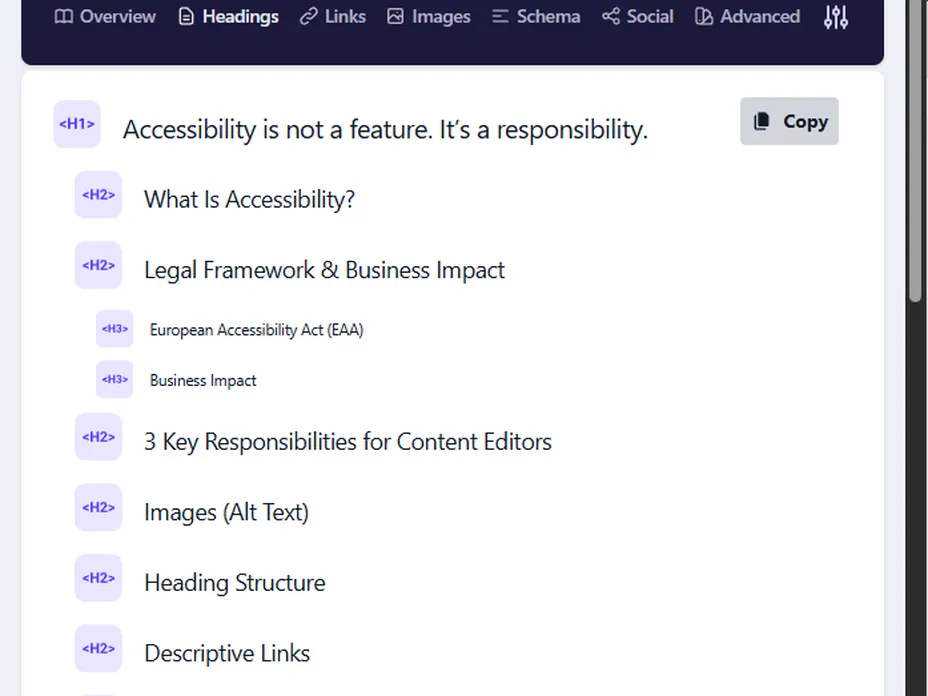
Semantic Structure & Heading Order

Screenshot of a webpage displaying a list of headings about accessibility, including "What Is Accessibility?" and "Legal Framework & Business Impact".

Meaningful Links

Image of a webpage showing a photo of a scenic hillside neighborhood in Hamburg. Details on link labeling guidance are displayed on the right.

Content Formatting Essentials

Screenshot of a text editing interface with options like Paragraph, bold, and bullet points. Text discusses real estate in Schöneberg.

Quick Accessibility Checklist for Editors

Before publishing, ask yourself:

1. Images

  • Have I added meaningful alt text to every image?

2. Headings

  • Does my page follow logical hierarchy (H1 → H2 → H3)?

3. Links

  • Are all links descriptive and understandable out of context?

4. Lists

  • Did I use proper list formatting?

5. Color

  • Is the content understandable without relying on color alone?